yazi (windows) 快速安装和配置指南
Yazi 是一款非常好用的命令行文件管理工具, 配合 Vim, 可以在非图形界面下很方便地浏览, 管理, 编辑文件.
Yazi 的官网提供了 详尽的配置方式说明, 但由于其兼容的系统较多, 每次想要找到一整套 windows 下的配置流程, 就比较麻烦. 因此这里总结了仅 windows 下的安装和基础配置方式.
安装
建议使用 scoop 安装. 没有 scoop 的可以先安装, 很好用.
安装方式可以参考这篇文章: Scoop 快速安装和配置指南.
1 | scoop install yazi |
安装依赖
file 命令行工具
yazi 依赖 file 来判断文件类型, 因此基本是必须安装的.
yazi 不建议使用包管理器安装 file 命令行工具. 而是建议使用 Git 下的 file 命令行工具.
原文: We do not recommend installing
filevia Scoop or Chocolatey, since they cannot handle Unicode filenames (such asoliver-sjöström.jpg) properly and lack some required parameters.
如果电脑之前没有安装过 Git. 你可以去官网下载并安装; 如果安装了 scoop, 也可以直接使用 scoop install git 安装.
- 使用官方安装器安装的 Git,
file的路径通常是C:\Program Files\Git\usr\bin\file.exe. - 使用 scoop 安装的 Git,
file的路径通常是C:\Users\<用户名>\scoop\apps\git\current\usr\bin\file.exe.
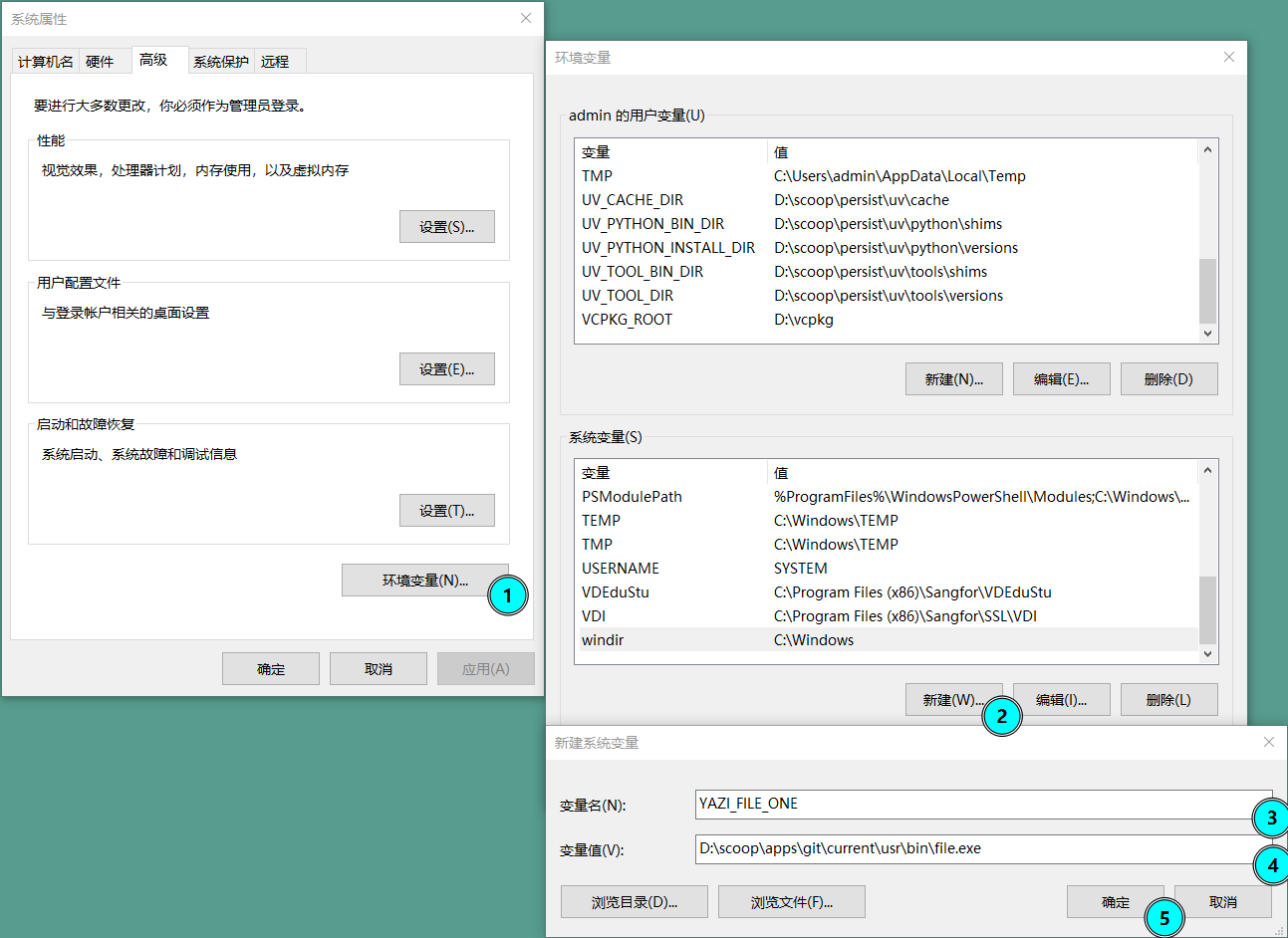
新建环境变量(想要快速到达界面, 可以按下 win + Q, 然后搜索 “编辑系统环境变量”), 键为 YAZI_FILE_ONE, 值为 file 的路径, 例如 C:\Program Files\Git\usr\bin\file.exe.
其它命令行工具
其它多种依赖建议直接使用 scoop 安装.
1 | scoop install ffmpeg 7zip jq poppler fd ripgrep fzf zoxide resvg imagemagick |
配置 y 启动
yazi 建议至少配置一个 y 命令, 以在退出 yazi 后, 保持最后的目录位置.
针对不同的 shell, 配置方式不同
cmd(命令行提示符)
新建一个 y.cmd 文件(任何位置都行), 将其添加到环境变量(%PATH%). 内容如下:
1 | @echo off |
pwsh(PowerShell)
在 pwsh 终端, 打开或新建 $PROFILE 文件. 如果不知道如何打开, 以下命令可以参考:
1 | # 查看 $PROFILE 的路径 |
添加以下内容到 $PROFILE 文件中, 保存后重启 pwsh 终端即可生效.
1 | function y { |
nushell
在 nushell 中, 使用 $nu.config-path 找到配置文件路径, 打开并添加以下内容:
1 | def --env y [...args] { |
覆盖默认配置
新安装的 yazi 使用 默认配置. 想要自定义, 我们需要新建配置文件, 在其中覆盖默认配置.
- %AppData%\yazi\config\yazi.toml
- %AppData%\yazi\config\keymap.toml
- %AppData%\yazi\config\theme.toml
如果不知道 %AppData% 实际上指什么, 可以在 cmd 中执行 echo %AppData%, 或者在 pwsh 中执行 $env:AppData 查看, 或者在 nushell 中执行 $env.AppData 查看.
例如, yazi 默认打开文件的方式是 code. 但我都用命令行了, 更希望使用 vim 打开, 所以我创建了 yazi.toml 文件, 并填入以下内容:
1 | # A TOML linter such as https://github.com/tombi-toml/tombi can use this schema to validate your config. |
以上内容是参考 官方默认配置 文件, 仅重写需覆盖部分而来. 有其它修改需求可以去那里看源文件.